• Activities
    • Health
    • Education
    • Mobile
    • Sports
    • PSL
  • Economy
    • Auto Industry
    • Crypto Currency
    • Economy
    • Smart Devices
  • Tech
    • Startups
    • Social
    • Telecom
    • Technology
  • TechX World
Saturday, April 18, 2026
TechX Pakistan
Gitex Africa
No Result
View All Result
  • Home
  • Health
  • Education
  • Sports
    • Champions Trophy 2025
    • ICC World Cup
    • Asia Cup
    • PSL
    • Point Table
  • Technology
  • Real Estate
    • Property
  • Lawyer
    • Tax Calculator
    • FBR
  • About us
  • Contact
  • Home
  • Health
  • Education
  • Sports
    • Champions Trophy 2025
    • ICC World Cup
    • Asia Cup
    • PSL
    • Point Table
  • Technology
  • Real Estate
    • Property
  • Lawyer
    • Tax Calculator
    • FBR
  • About us
  • Contact
No Result
View All Result
TechX Pakistan
No Result
View All Result
  • Home
  • Health
  • Education
  • Sports
  • Technology
  • Real Estate
  • Lawyer
  • About us
  • Contact
Home Mobile

WhatsApp View Once Feature: How to Send Photos or Videos for a Single View on Android, iPhone, Desktop, and More

by
December 28, 2021
in Mobile
Reading Time: 5 mins read
A A
0
WhatsApp View Once Feature: How to Send Photos or Videos for a Single View on Android, iPhone, Desktop, and More

This blog post has been originally posted in www.mysmartprice.com

WhatsApp is probably of the few applications that always thrive to make the user experience pleasing. The company has introduced a plethora of features to its platforms on Android, iOS, desktop, and more to make the user experience even better as compared to other instant messaging applications. And now, the brand has now introduced a new WhatsApp View Once feature to all its users across the globe. But what is it? The feature has taken its inspiration from Snapchat and allows the users to send photos and videos that will disappear after the recipient has opened it and exited the viewer. But, how to use this? In this article, we have talked in detail about how to use the WhatsApp View Once feature on Android, iOS, desktop, and KaiOS. So, without further ado, let’s get started.

Also Read: WhatsApp Tricks: How to Send a WhatsApp Message Without Saving a Mobile Number

Table of Contents

Toggle
  • What is WhatsApp View Once Feature?
  • How to Use WhatsApp View Once Feature on Android?
  • How to Use WhatsApp View Once Feature on iPhone?
  • How to Use WhatsApp View Once Feature on Desktop?
  • How to Use WhatsApp View Once Feature on KaiOS?

What is WhatsApp View Once Feature?

WhatsApp has introduced a new feature to its customers that allows one to send photos and videos on the recipient’s phone for only one time. The company has revealed that once the recipient watches the photo or video, it will disappear from the chat history. In order to use the new feature, users will have to update the WhatsApp application to the latest version. Apart from this, with the WhatsApp View Once feature, once a user has sent a photo or video, he/she won’t be able to view it again. Here is some information about the latest feature:

  • Media will not be saved in Photos or Gallery of the recipient’s phone.
  • One cannot forward, save, or share photos or videos that were sent using this feature
  • The sender can only see whether the recipient has viewed the photo or video
  • The photo or video will disappear after 14 days if the recipient has not opened it
  • One can still take a screenshot or screen recording of the media before it disappears
  • Encrypted media may be stored for a few weeks on WhatsApp’s servers after you’ve sent it.

Also Read: WhatsApp Status Download: How to Download WhatsApp Status Images and Videos Online

How to Use WhatsApp View Once Feature on Android?

Once you understand the benefits and risks of the WhatsApp View Once feature, here’s how you can use it on your Android smartphone:

  1. Open the WhatsApp application on your Android smartphone and click on the chat you want to send the photo or video.
  2. Tap on the Attachment button at the bottom of the screen and then either click the photo or use it from the Gallery.
  3. Tap on 1 right next to the caption box.
  4. Now, simply tap on Send.

With this, you will be able to send the photo or video one time to the recipient using this feature. Moreover, one will be able to see an Opened receipt in the cat once the recipient has viewed it.

Also Read: WhatsApp Online Status: How to Appear Offline or Hide Online Status on WhatsApp Web, Mobile App

How to Use WhatsApp View Once Feature on iPhone?

Here’s how you can send photos or videos using WhatsApp View Once feature on iPhone:

  1. Open the WhatsApp application on your iPhone and click on the individual or group chat.
  2. Tap on the Camera icon to take a photo or video, or select one from the Album
  3. Tap on 1 right next to the caption box and click on Send to share the photo or video using WhatsApp View Once feature.

Also Read: WhatsApp: How to Create Custom Stickers on WhatsApp Web and Desktop

How to Use WhatsApp View Once Feature on Desktop?
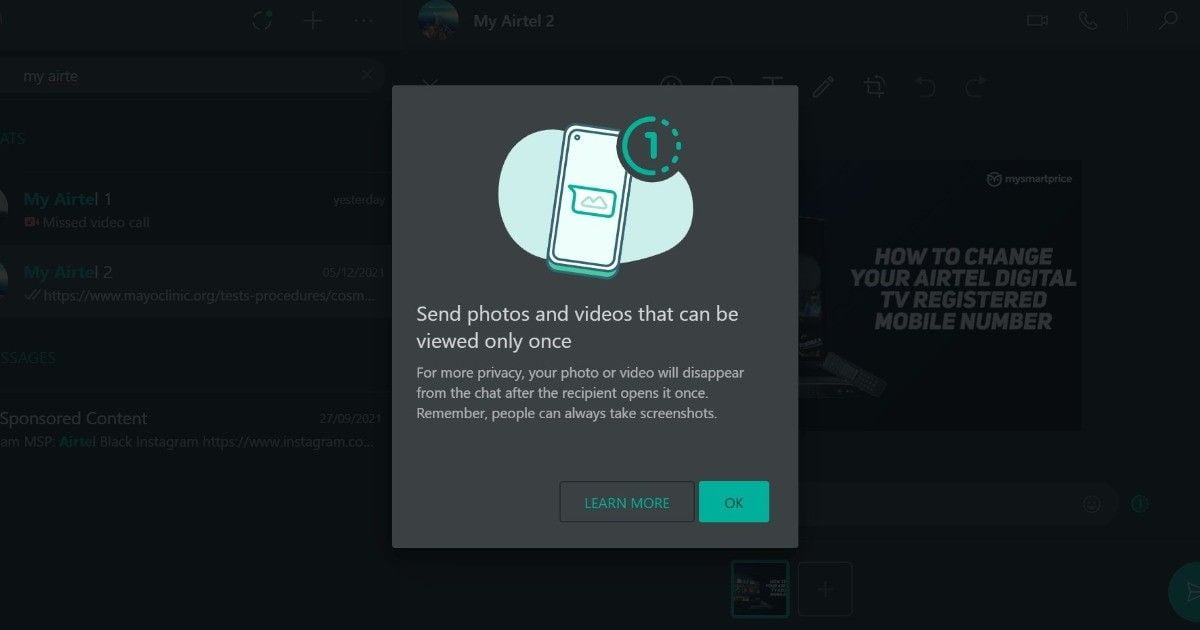
Follow these steps to send disappearing photos and videos from the WhatsApp desktop application as well. Here’s how you can do it:

  1. Open the WhatsApp desktop application on your Windows or Mac computer.
  2. Click on the individual or group chat to which you want to send the photo or video
  3. Now click on the ‘Attach’ icon and select the photo or video from the computer.
  4. Tap on 1 right next to the caption box and click on Send to share the photo or video using WhatsApp View Once feature.

How to Use WhatsApp View Once Feature on KaiOS?

WhatsApp has also revealed that KaiOS users can also use this feature. As per the company, you can a photo or video that will disappear on WhatsApp after the recipient has opened it and exited the media viewer. Here’s how you can send it on KaiOS:

  1. Open the WhatsApp application on your KaiOS phone
  2. Click on Attach file and then select the photos or video from the gallery, or simply click a new one from the camera.
  3. Click on 1 present in the caption box and tap on Send option.

The post WhatsApp View Once Feature: How to Send Photos or Videos for a Single View on Android, iPhone, Desktop, and More appeared first on MySmartPrice.

source
This blog post has been originally posted in www.mysmartprice.com

Tags: Mobile PhoneMobile review
Share50Tweet32Share9Send

Related Posts

Android Phones That Work Like iPhone AirDrop for Sharing Files

by TechX Content Specialist
April 14, 2026
0
Air Drop

AirDrop is a feature by Apple that allows fast file sharing between Apple devices like iPhone, iPad, and Mac. Android...

Read moreDetails

Apple Reportedly Testing 200MP Ultra High Resolution Camera for Future iPhones

by TechX Content Specialist
March 30, 2026
0
Apple 200MP

Apple is reportedly testing a 200‑megapixel camera sensor that could mark a significant upgrade for future iPhone models. According to...

Read moreDetails

Follow Us

Promoted

GITEX Africa

GITEX Africa Morocco 2026 Africa Premier Technology & Startup Event

by TechX Content Specialist
March 17, 2026
0

GITEX Africa 2026 is one of the largest technology and startup events in Africa, scheduled to take place from April...

India AI Summit

India AI Summit An Analysis of Logistical Failures and Technical Hurdles

by TechX Content Specialist
February 23, 2026
0

As interest in Artificial Intelligence (AI) surges globally, South Asian nations are racing to establish themselves as regional tech hubs....

Pakistan to Host Indus AI Week 2026

Pakistan to Host Indus AI Week 2026

by TechX Editor
February 5, 2026
0

Join Indus AI Week 2026 in Islamabad from Feb 9-15, showcasing AI innovation, techathons, and global collaboration for Pakistan’s digital...

GITEX Africa 2026 Morocco: Africa Largest Tech and Startup Show

GITEX Africa 2026 Morocco: Africa Largest Tech and Startup Show

by TechX Content Specialist
February 5, 2026
0

GITEX Africa 2026 is returning with bigger ambition and wider global attention. The event is ready to place Morocco firmly...

Recent News

Iran Recloses Strait of Hormuz Military Spokesperson Blames Repeated U.S Violations

Iran Recloses Strait of Hormuz Military Spokesperson Blames Repeated U.S Violations

April 18, 2026
PSL 11 Match 27 Preview Lahore Qalandars vs Rawalpindiz

PSL 11 Match 27 Preview Lahore Qalandars vs Rawalpindiz

April 18, 2026
Epic Fury

U.S. Troops Consumed 950,000 Gallons of Coffee and 2 Million Energy Drinks During 38 Day Iran Mission

April 18, 2026
Strait of Hormuz

Iran Shuts Strait of Hormuz Again As U.S. Maintains Naval Blockade

April 18, 2026
IRGC

IRGC Introduces New Maritime Control Rules as Iran Strengthens Authority Over the Strait of Hormuz

April 18, 2026
US Iran talks

US Iran Talks Reported in Islamabad 2nd Round Expected on Monday

April 18, 2026
Currently Playing

TechX Pakistan at GITEX Dubai 2024 | Innovation, AI & Global Tech Highlights

TechX Pakistan at GITEX Dubai 2024 | Innovation, AI & Global Tech Highlights

00:02:06

TechX Pakistan at LEAP 2025 | Saudi Arabia’s Mega Tech Conference Uncovered

00:03:37

Pakistan – The Mineral Marvel | Pakistan Pavilion at Future Minerals Forum 2025

00:03:09

TechX Pakistan at ITCN Asia Karachi 2024 | Innovation, Startups & Future Tech Highlights

00:02:22

TechX Pakistan at ITCN Asia Lahore 2024 | Official Media Partner Coverage

00:03:41

TechX x Doogee | GITEX 2024 Collaboration Featuring Iranian TikTok Star

00:01:09

Highlights from the World CIO 200 Summit - Pakistan Edition 2024 | TechX Pakistan

00:01:42

Leap 2024 | The most attended tech event in Saudi Arabia | covered by TechX Pakistan

00:03:46

Gitex Dubai 2023 Sneak Peeks by TechX Pakistan

00:01:47

Gitex Africa 2023: TechX Pakistan Honored To Cover The Event. @GITEXAFRICA

00:01:50

LEAP 2023, a Global Technology Event at Riyadh covered by TechX Pakistan

00:02:40

GITEX GLOBAL 2022 Presence of Pakistan, Connexion Lounge sponsored by @MinistryofITTelecomPakistan

00:01:40

ITCN Asia 2022 | 21st International IT and Telecom Show | Curtains Opened | TechX Pakistan

00:05:28

London Tech Week 2022 Highlights | #Pakistan #Software

00:02:58

#Zindigi Future Fest 2022 Curtains Opened | Day 01 Glimpses | Tour | TechX Pakistan

00:03:13

Wait is Over, ITCN Asia Pakistan Tech Fest 2022 is live now!

00:01:44

CXO Meetup Dubai by Tech Destination Pakistan - P@SHA x PSEX x MoITT

00:02:41

Workshop on IT Investment Opportunities by Tech Destination Pakistan

00:00:56

Pakistan Pavilion at GITEX Dubai 2021

00:01:39

#GITEX 2021 Curtains Opened | Day 01 Glimpses | 5G | Technology | Tour | TechX Pakistan

00:01:33

GITEX Technology Week 2020 by TechX Pakistan - Official Media Partner

00:01:27

Newsletter Subscription

Get daily/weekly tech updates, exclusive insights, and breaking news delivered directly to your inbox.

Loading

Since 2019, TechX Pakistan has been revolutionizing local tech and social blogging. We bring the latest news, interviews, and events on global and local advancements.

Join us in exploring IT startups, business insights, and social media trends. Celebrate and drive the tech evolution with us!

USEFUL LINKS

Home

About Us

Contact Us

Privacy Policy

Sponsored

Terms and Conditions

Site Map

CATEGORIES

Health

Crypto Currency

Technology

Sports

Finance

Curent Affairs

FOLLOW US

TECH INSIGHTS

Stay informed about the latest advancements in technology. Join our WhatsApp Group to receive curated news, insights, and updates straight to your inbox.

© 2025 TechX.pk - All right reserved 

Welcome Back!

Login to your account below

Forgotten Password?

Retrieve your password

Please enter your username or email address to reset your password.

Log In

Add New Playlist

No Result
View All Result
  • Home
  • Health
  • Education
  • Sports
    • Champions Trophy 2025
    • ICC World Cup
    • Asia Cup
    • PSL
    • Point Table
  • Technology
  • Real Estate
    • Property
  • Lawyer
    • Tax Calculator
    • FBR
  • About us
  • Contact

© 2019 - 2024 TechX Pakistan - All Rights Reserved

Go to mobile version