
• Activities
    • Health
    • Education
    • Mobile
    • Sports
    • PSL
  • Economy
    • Auto Industry
    • Crypto Currency
    • Economy
    • Smart Devices
  • Tech
    • Startups
    • Social
    • Telecom
    • Technology
  • TechX World
Thursday, August 20, 2026
Contact us on Whatsapp
TechX Pakistan
No Result
View All Result
  • Home
  • Health
  • Education
  • Sports
    • FIFA World Cup
    • Champions Trophy
    • ICC World Cup
    • Asia Cup
    • PSL
  • Technology
  • Real Estate
    • Property
  • Lawyer
    • Tax Calculator
    • FBR
  • About us
  • Contact
  • Home
  • Health
  • Education
  • Sports
    • FIFA World Cup
    • Champions Trophy
    • ICC World Cup
    • Asia Cup
    • PSL
  • Technology
  • Real Estate
    • Property
  • Lawyer
    • Tax Calculator
    • FBR
  • About us
  • Contact
No Result
View All Result
TechX Pakistan
  • Home
  • Health
  • Education
  • Sports
  • Technology
  • Real Estate
  • Lawyer
  • About us
  • Contact
Home How To

How To simply enter into Safe Mode in Windows 10

TechX Editor by TechX Editor
September 6, 2023
in How To
Reading Time: 4 mins read
A A
0
how-to-simply-enter-into-safe-mode-in-windows-10

Booting into Safe Mode is a standard step while troubleshooting a computer. For a long time, this was accomplished by pressing the F8 key; but, with Windows 10 and its Automatic Repair option, this is no longer the case. But what if we require Safe Mode?

Table of Contents

Toggle
  • Booting into Safe Mode
    • Recovery Environment During Startup
    • Advanced Recovery Menu
    • Advanced Startup area
      • Computer Is Unable to Start Windows Normally
    • 2. Launch Safe Mode using the Advanced Troubleshooting Tools

Booting into Safe Mode

If you press the F8 key at the appropriate time (or are lucky enough to spam the key during boot up), Windows may still send you to a screen that allows you to enter the recovery environment.

Recovery Environment During Startup

You can then boot into Safe Mode (which we’ll discuss in more detail later). However, some computer manufacturers deactivate this option.

Even on PCs that still support it, Windows startup (especially the handoff between the standard boot process and Windows startup) now happens so quickly that you barely have time to push the key.

Advanced Recovery Menu

On Windows 10 and Windows 11, there is a more dependable way to enter Safe Mode, often known as the Advanced Recovery Menu. The procedure is only sort of veiled.

  1. Navigate to the Recovery Environment’s Advanced Troubleshooting Tools

The majority of ways to access Safe Mode entail first entering the Windows recovery environment.

Safe Mode is one of the troubleshooting alternatives available in the recovery environment. Whether or whether your PC can start Windows normally determines how you get there.

If your PC successfully boots to the Windows login screen (or you can actually sign into Windows).

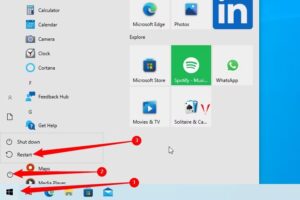
The quickest path to the recovery environment is to hold down the Shift key while hitting Restart (either from the sign in screen or from the Start menu).

how-to-simply-enter-into-safe-mode-in-windows-10

how-to-simply-enter-into-safe-mode-in-windows-10

You can also access the recovery environment via the Settings app. To open Settings, press Windows+I, and then select the “Update & Security” option.

Navigate to the “Recovery” tab in the left pane. Scroll down a little in the right pane, and then select the “Restart Now” button under the “Advanced Startup” area.

Advanced Startup area

Using either of these ways (Shift+Restart or the Settings app) will transport you to the recovery environment, which we’ll go over in more detail in the section on the second phase of this process.

Computer Is Unable to Start Windows Normally

If your computer fails to start Windows normally twice in a row, it should automatically display a “Recovery” option that allows you to view advanced repair choices.

2. Launch Safe Mode using the Advanced Troubleshooting Tools

When you get to the advanced troubleshooting tools (through the Shift+Restart technique, the F8 key, or a recovery drive), you’ll get a panel that allows you to use the troubleshooting tools. To proceed, click the “Troubleshoot” button.

Click the “Advanced Options” button on the “Troubleshoot” screen.

Click the Startup Settings” option on the “Advanced Options” page. This option is now named “Windows Startup Settings” in Windows 8.

Finally, now that you understand what we meant by “hidden,” press the “Restart” button.

The typical Advanced Boot Options menu will appear. Press the number that corresponds to the startup choice you want to use (for example, 4 for standard Safe Mode).

Yes, it’s a complicated path to Safe Mode, and these settings are much more concealed than in the past. But, at the very least, they’re still available.

To read our blog on “How to use your iPhone to track for your ‘lost’ Apple watch,” click here

Share64Tweet40Share11Send
TechX Editor

TechX Editor

Hi! I'm the Editor at TechX Pakistan, where I specialize in managing and enhancing the SEO for our website. My role involves optimizing content to ensure maximum visibility and engagement, analyzing performance metrics to drive traffic, and staying up-to-date with the latest in search engine algorithms. My goal is to ensure that our website not only reaches but also resonates with our target audience, ensuring they find exactly what they need quickly and efficiently.

Related Posts

How to Get an Internship at the National Assembly of Pakistan

by TechX Editor
April 21, 2025
0
How to Apply for National Assembly Internship of Pakistan

The National Assembly of Pakistan has announced its Parliamentary Internship Program – Summer Batch 2025, offering a six-week hands-on experience for students and...

Read moreDetails

How to Check Ufone Remaining MBs in 2025

by TechX Editor
April 5, 2025
0
How to Check Ufone Remaining MBs in 2025

In 2025, staying connected is essential, and monitoring your data balance ensures uninterrupted internet access. Ufone offers multiple ways to...

Read moreDetails

Follow Us

Stay Ahead with TechX Weekly

TechX Weekly
Pakistan's Tech week in 5 minutes, Every Saturday morning, Straight to your Inbox. Free and Zero spam.

Promoted

World CIO 200 Summit 2026, Pakistan Edition Returns to Karachi

World CIO 200 Summit 2026, Pakistan Edition Returns to Karachi

by 0xTechX
August 17, 2026
0

World CIO 200 Summit 2026 - Pakistan Edition Returns to Karachi TechX Pakistan Proudly Joins as Supporting Partner for the...

Mecca Joint Defence Agreement Binds Pakistan, Saudi Arabia and Turkey

by 0xTechX
August 8, 2026
0

The Mecca Joint Defence Agreement signed on 7 August 2026 unites Pakistan, Saudi Arabia and Turkey in a historic collective...

GITEX AI Europe 2026: Berlin’s Biggest AI & Tech Event

GITEX AI Europe 2026: Berlin’s Biggest AI & Tech Event

by Techx Editor
April 30, 2026
0

GITEX AI Europe 2026: Berlin to Host Europe’s Largest AI and Technology Gathering Europe is preparing to welcome one of...

GITEX Africa

GITEX Africa Morocco 2026 Africa Premier Technology & Startup Event

by TechX Content Specialist
March 17, 2026
0

GITEX Africa 2026 is one of the largest technology and startup events in Africa, scheduled to take place from April...

Currently Playing

TechX Pakistan at GITEX Dubai 2024 | Innovation, AI & Global Tech Highlights

TechX Pakistan at GITEX Dubai 2024 | Innovation, AI & Global Tech Highlights

00:02:06

TechX Pakistan at LEAP 2025 | Saudi Arabia’s Mega Tech Conference Uncovered

00:03:37

Pakistan – The Mineral Marvel | Pakistan Pavilion at Future Minerals Forum 2025

00:03:09

TechX Pakistan at ITCN Asia Karachi 2024 | Innovation, Startups & Future Tech Highlights

00:02:22

TechX Pakistan at ITCN Asia Lahore 2024 | Official Media Partner Coverage

00:03:41

TechX x Doogee | GITEX 2024 Collaboration Featuring Iranian TikTok Star

00:01:09

Highlights from the World CIO 200 Summit - Pakistan Edition 2024 | TechX Pakistan

00:01:42

Leap 2024 | The most attended tech event in Saudi Arabia | covered by TechX Pakistan

00:03:46

Gitex Dubai 2023 Sneak Peeks by TechX Pakistan

00:01:47

Gitex Africa 2023: TechX Pakistan Honored To Cover The Event. @GITEXAFRICA

00:01:50

LEAP 2023, a Global Technology Event at Riyadh covered by TechX Pakistan

00:02:40

GITEX GLOBAL 2022 Presence of Pakistan, Connexion Lounge sponsored by @MinistryofITTelecomPakistan

00:01:40

ITCN Asia 2022 | 21st International IT and Telecom Show | Curtains Opened | TechX Pakistan

00:05:28

London Tech Week 2022 Highlights | #Pakistan #Software

00:02:58

#Zindigi Future Fest 2022 Curtains Opened | Day 01 Glimpses | Tour | TechX Pakistan

00:03:13

Wait is Over, ITCN Asia Pakistan Tech Fest 2022 is live now!

00:01:44

CXO Meetup Dubai by Tech Destination Pakistan - P@SHA x PSEX x MoITT

00:02:41

Workshop on IT Investment Opportunities by Tech Destination Pakistan

00:00:56

Pakistan Pavilion at GITEX Dubai 2021

00:01:39

#GITEX 2021 Curtains Opened | Day 01 Glimpses | 5G | Technology | Tour | TechX Pakistan

00:01:33

GITEX Technology Week 2020 by TechX Pakistan - Official Media Partner

00:01:27

Recent News

ADB Pakistan Reforms Grant Sends a Clear Signal to Tech Investors

August 20, 2026

Google Pakistan Office Opens in Islamabad with PM Shehbaz

August 20, 2026
gold rate in Pakistan today 20 August 2026

Gold Rate in Pakistan Today 20 August 2026: Dollar, Petrol and Copper Prices

August 20, 2026

Pakistan IT Exports Hit $417 Million in July at Record Pace

August 20, 2026
petrol price in Pakistan today

Petrol Price in Pakistan Today: OGRA Raises Petrol and Diesel Rates from 19 August 2026

August 20, 2026

HEC Opens Door for Blockchain Courses in Pakistan Universities

August 19, 2026
 

Since 2019, TechX Pakistan has been revolutionizing local tech and social blogging. We bring the latest news, interviews, and events on global and local advancements.

Join us in exploring IT startups, business insights, and social media trends. Celebrate and drive the tech evolution with us!

USEFUL LINKS

Home

About Us

Contact Us

Privacy Policy

Sponsored

Terms and Conditions

Site Map

CATEGORIES

Health

Crypto Currency

Technology

Sports

Finance

Curent Affairs

FOLLOW US

TECH INSIGHTS

Stay informed about the latest advancements in technology. Join our WhatsApp Group to receive curated news, insights, and updates straight to your inbox.

© 2025 TechX.pk - All right reserved 

No Result
View All Result
  • Home
  • Health
  • Education
  • Sports
    • FIFA World Cup
    • Champions Trophy
    • ICC World Cup
    • Asia Cup
    • PSL
  • Technology
  • Real Estate
    • Property
  • Lawyer
    • Tax Calculator
    • FBR
  • About us
  • Contact

© 2019 - 2026 TechX Pakistan - All Rights Reserved

Go to mobile version