
• Activities
    • Health
    • Education
    • Mobile
    • Sports
    • PSL
  • Economy
    • Auto Industry
    • Crypto Currency
    • Economy
    • Smart Devices
  • Tech
    • Startups
    • Social
    • Telecom
    • Technology
  • TechX World
Friday, August 21, 2026
Contact us on Whatsapp
TechX Pakistan
No Result
View All Result
  • Home
  • Health
  • Education
  • Sports
    • FIFA World Cup
    • Champions Trophy
    • ICC World Cup
    • Asia Cup
    • PSL
  • Technology
  • Real Estate
    • Property
  • Lawyer
    • Tax Calculator
    • FBR
  • About us
  • Contact
  • Home
  • Health
  • Education
  • Sports
    • FIFA World Cup
    • Champions Trophy
    • ICC World Cup
    • Asia Cup
    • PSL
  • Technology
  • Real Estate
    • Property
  • Lawyer
    • Tax Calculator
    • FBR
  • About us
  • Contact
No Result
View All Result
TechX Pakistan
  • Home
  • Health
  • Education
  • Sports
  • Technology
  • Real Estate
  • Lawyer
  • About us
  • Contact
Home How To

How To placing emulators on the steam deck

TechX Editor by TechX Editor
January 17, 2023
in How To
Reading Time: 5 mins read
A A
0
How To placing emulators on the steam deck

When you’ve exhausted all of the latest releases on your Steam Deck, you can turn your handheld console into an emulator and play a variety of classics from gaming’s past.

With the right software and a little know-how, you can use your Valve device to play games from the GameCube, the original PlayStation, the Xbox 360, and other older platforms.

When it comes to the emulation software that will run on the Steam Deck, you have a few options, but our current favourite is EmuDeck.

It’s comprehensive, simple to set up, and completely free to use. It does, however, rely on a suite of scripts to manage the emulation—if you’re looking for something more self-contained and app-like, try Batocera or RetroDeck.

How to Install EmuDeck

To get EmuDeck up and running, you must first prepare it.

A microSD card is the best option for storing your emulator games, and a U3 A2 card, such as those available from SanDisk’s Extreme line, will produce the best results.

We’ll also be using desktop mode inside the Steam Deck, so you can speed up the installation by connecting a keyboard and mouse (either over Bluetooth or via a USB hub).

This isn’t required, but it does make it easier to type on the device and move through the steps we’ll go over here.

On your console, press the Steam button, then select Power and Switch to Desktop.

This means you’re in a traditional Linux environment, so launch the Firefox browser that comes preinstalled and navigate to the EmuDeck website. Choose Download from the menu at the top, then Download installer, and save the file to your desktop.

how-to-placing-emulators-on-the-steam-deck

Double-click the file you just downloaded to begin the installation process.

You then have a choice between Easy mode, which does the majority of the configuration work for you, and Custom mode, which allows you to specify which emulators to instal as well as various other options (such as aspect ratios and themes).

Choose whichever option best suits your time and patience: The quickest mode is Easy, but the questions in Custom mode aren’t difficult, and it does allow you to select the specific emulators you’re interested in (if you’ve never heard of any of them, some quick web research will help).

Whichever option you select, you’ll be asked to select an instal location, so select your microSD card.

If you become more familiar with EmuDeck, you can simply run the same installation file again to select different emulators or change any of the configuration settings, so don’t feel obligated to stick with your initial choices indefinitely. The installer will copy and instal all of the required files before you can begin loading games.

EmuDeck: How to Use It

We’re not going to get into the contentious and legally ambiguous issue of where you get your BIOS and ROM files in this guide, but you’ll need both: The BIOS files required to run the emulators (details here) and the ROM files for the actual games.

The simplest way to transfer these files from your computer to the Steam Deck is to use a flash drive or portable hard drive.

The microSD card cannot be used directly because Windows and macOS cannot read such cards after the Linux formatting used by the Steam Deck has been applied.

The Steam Deck, on the other hand, can read drives formatted by Windows and macOS, so you can plug a drive containing BIOS and ROM files into your handheld and copy the contents over.

You could also go wireless and use a solution like Windows file sharing.


On the microSD card, you’ll find the following folders: Specifically, “Primary/Emulation/bios/” for BIOS files and “Primary/Emulation/roms/” for ROMs, where “Primary” is the card’s name. Each emulator will have its own folder, so figuring out what goes where shouldn’t be too difficult.
how-to-placing-emulators-on-the-steam-deck

You must then ensure that your Steam Deck can see all of these fantastic emulators and games.

From the Linux desktop, run the EmuDeck installer again, then select Tools & stuff and SteamRomManager.

The following screen will display a list of emulators on the left: Toggle on the ones where you want their games to appear in the Steam Deck interface, or simply select EmulationStationDE to access all your emulators and games from the home screen menu.

The Steam ROM Manager will show you what it finds if you click Preview (top left), then Generate app list. Choose Save app list, and all of your selected emulators and games will be added to Steam within a few minutes.

You can then launch Steam in Linux and delete the entries for the games you don’t want direct access to (right-click then Manage and Remove selected non-Steam games from your library).

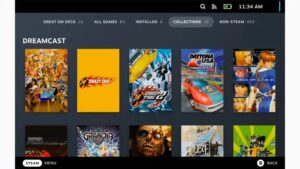
Return to Gaming Mode from the Linux desktop, and your games should be ready to play via the Library section of the standard Steam Deck interface: The ones you chose earlier will appear individually, but you can also access every ROM in your library that you’ve copied over with EmulationStation.

If something goes wrong, go back and retrace your steps—you’ll find a wealth of assistance and useful information on the EmuDeck Discord and the EmuDeck Wiki.

To read our blog on “How To add subtitles to any device’s audio and video live caption,” click here


Tags: best emulator for steam deckemudeckhow to install emulators on steam deck redditsteam deck desktop modesteam deck emulation redditsteam deck emulation switchsteam deck emulatorssteam deck romssteam rom manager
Share61Tweet38Share11Send
TechX Editor

TechX Editor

Hi! I'm the Editor at TechX Pakistan, where I specialize in managing and enhancing the SEO for our website. My role involves optimizing content to ensure maximum visibility and engagement, analyzing performance metrics to drive traffic, and staying up-to-date with the latest in search engine algorithms. My goal is to ensure that our website not only reaches but also resonates with our target audience, ensuring they find exactly what they need quickly and efficiently.

Related Posts

How to Get an Internship at the National Assembly of Pakistan

by TechX Editor
April 21, 2025
0
How to Apply for National Assembly Internship of Pakistan

The National Assembly of Pakistan has announced its Parliamentary Internship Program – Summer Batch 2025, offering a six-week hands-on experience for students and...

Read moreDetails

How to Check Ufone Remaining MBs in 2025

by TechX Editor
April 5, 2025
0
How to Check Ufone Remaining MBs in 2025

In 2025, staying connected is essential, and monitoring your data balance ensures uninterrupted internet access. Ufone offers multiple ways to...

Read moreDetails

Follow Us

Stay Ahead with TechX Weekly

TechX Weekly
Pakistan's Tech week in 5 minutes, Every Saturday morning, Straight to your Inbox. Free and Zero spam.

Promoted

World CIO 200 Summit 2026, Pakistan Edition Returns to Karachi

World CIO 200 Summit 2026, Pakistan Edition Returns to Karachi

by 0xTechX
August 17, 2026
0

World CIO 200 Summit 2026 - Pakistan Edition Returns to Karachi TechX Pakistan Proudly Joins as Supporting Partner for the...

Mecca Joint Defence Agreement Binds Pakistan, Saudi Arabia and Turkey

by 0xTechX
August 8, 2026
0

The Mecca Joint Defence Agreement signed on 7 August 2026 unites Pakistan, Saudi Arabia and Turkey in a historic collective...

GITEX AI Europe 2026: Berlin’s Biggest AI & Tech Event

GITEX AI Europe 2026: Berlin’s Biggest AI & Tech Event

by Techx Editor
April 30, 2026
0

GITEX AI Europe 2026: Berlin to Host Europe’s Largest AI and Technology Gathering Europe is preparing to welcome one of...

GITEX Africa

GITEX Africa Morocco 2026 Africa Premier Technology & Startup Event

by TechX Content Specialist
March 17, 2026
0

GITEX Africa 2026 is one of the largest technology and startup events in Africa, scheduled to take place from April...

Currently Playing

TechX Pakistan at GITEX Dubai 2024 | Innovation, AI & Global Tech Highlights

TechX Pakistan at GITEX Dubai 2024 | Innovation, AI & Global Tech Highlights

00:02:06

TechX Pakistan at LEAP 2025 | Saudi Arabia’s Mega Tech Conference Uncovered

00:03:37

Pakistan – The Mineral Marvel | Pakistan Pavilion at Future Minerals Forum 2025

00:03:09

TechX Pakistan at ITCN Asia Karachi 2024 | Innovation, Startups & Future Tech Highlights

00:02:22

TechX Pakistan at ITCN Asia Lahore 2024 | Official Media Partner Coverage

00:03:41

TechX x Doogee | GITEX 2024 Collaboration Featuring Iranian TikTok Star

00:01:09

Highlights from the World CIO 200 Summit - Pakistan Edition 2024 | TechX Pakistan

00:01:42

Leap 2024 | The most attended tech event in Saudi Arabia | covered by TechX Pakistan

00:03:46

Gitex Dubai 2023 Sneak Peeks by TechX Pakistan

00:01:47

Gitex Africa 2023: TechX Pakistan Honored To Cover The Event. @GITEXAFRICA

00:01:50

LEAP 2023, a Global Technology Event at Riyadh covered by TechX Pakistan

00:02:40

GITEX GLOBAL 2022 Presence of Pakistan, Connexion Lounge sponsored by @MinistryofITTelecomPakistan

00:01:40

ITCN Asia 2022 | 21st International IT and Telecom Show | Curtains Opened | TechX Pakistan

00:05:28

London Tech Week 2022 Highlights | #Pakistan #Software

00:02:58

#Zindigi Future Fest 2022 Curtains Opened | Day 01 Glimpses | Tour | TechX Pakistan

00:03:13

Wait is Over, ITCN Asia Pakistan Tech Fest 2022 is live now!

00:01:44

CXO Meetup Dubai by Tech Destination Pakistan - P@SHA x PSEX x MoITT

00:02:41

Workshop on IT Investment Opportunities by Tech Destination Pakistan

00:00:56

Pakistan Pavilion at GITEX Dubai 2021

00:01:39

#GITEX 2021 Curtains Opened | Day 01 Glimpses | 5G | Technology | Tour | TechX Pakistan

00:01:33

GITEX Technology Week 2020 by TechX Pakistan - Official Media Partner

00:01:27

Recent News

petrol price in Pakistan today

Petrol Price in Pakistan Today: Petrol Up Rs 2.97, Diesel Drops Rs 32.63 from 20 August 2026

August 21, 2026

ADB Pakistan Reforms Grant Sends a Clear Signal to Tech Investors

August 20, 2026

Google Pakistan Office Opens in Islamabad with PM Shehbaz

August 20, 2026
gold rate in Pakistan today 20 August 2026

Gold Rate in Pakistan Today 20 August 2026: Dollar, Petrol and Copper Prices

August 20, 2026

Pakistan IT Exports Hit $417 Million in July at Record Pace

August 20, 2026
petrol price in Pakistan today

Petrol Price in Pakistan Today: OGRA Raises Petrol and Diesel Rates from 19 August 2026

August 20, 2026
 

Since 2019, TechX Pakistan has been revolutionizing local tech and social blogging. We bring the latest news, interviews, and events on global and local advancements.

Join us in exploring IT startups, business insights, and social media trends. Celebrate and drive the tech evolution with us!

USEFUL LINKS

Home

About Us

Contact Us

Privacy Policy

Sponsored

Terms and Conditions

Site Map

CATEGORIES

Health

Crypto Currency

Technology

Sports

Finance

Curent Affairs

FOLLOW US

TECH INSIGHTS

Stay informed about the latest advancements in technology. Join our WhatsApp Group to receive curated news, insights, and updates straight to your inbox.

© 2025 TechX.pk - All right reserved 

No Result
View All Result
  • Home
  • Health
  • Education
  • Sports
    • FIFA World Cup
    • Champions Trophy
    • ICC World Cup
    • Asia Cup
    • PSL
  • Technology
  • Real Estate
    • Property
  • Lawyer
    • Tax Calculator
    • FBR
  • About us
  • Contact

© 2019 - 2026 TechX Pakistan - All Rights Reserved

Go to mobile version