In several ways, Microsoft’s current operating system is similar to previous ones: Applications, files, and folders can soon clog up local storage space, leaving you with a decreasing amount of free gigabytes and a sluggish, difficult-to-use machine. When these troubles become too much to bear, a thorough PC reset can be beneficial.
If you’re unfamiliar with the concept of resetting your computer, don’t worry—Windows and macOS users have been doing it for years, and the procedures we’ll walk you through will also work on previous versions of Windows.
Windows 11 setup
It essentially restores your laptop or desktop to its original condition, free of all the other apps, data, and settings that it has gathered since.
While modern computers are designed to handle anything we can throw at them, digital detritus accumulates over time, whether it’s applications we once used on a regular basis that are now sitting unused on the hard drive, or folders of files that are completely redundant (whether it’s duplicate files or setup packages that are no longer required).
You can pick away at the clutter and junk piece by piece, but it’s usually far easier to simply wipe the slate clear and start again.
If Windows 11 is a house, you’re restoring it to its original form rather than doing some spring cleaning—that’s a radical move, but it’s an effective one.
The process of resetting Windows 11 removes everything on your PC, which means you’ll need to backup your most crucial files first: The simplest way to do this on Windows is probably using OneDrive, which you can configure in Settings under System, Accounts, and Windows backup. Everything in your OneDrive folder is immediately synchronised to the web and is available for download whenever you need it.
You may backup your files in a variety of ways, including moving them to an external hard drive and utilising a third-party cloud syncing service like Dropbox or Google Drive. What important is that your files are backed up somewhere—ideally, in two distinct locations.

Remember that following the reset procedure, you’ll have to re-login to all of your websites and digital services, so make sure you remember all of your usernames and passwords.
The simplest solution is to use a password manager or your browser to store your numerous logins: Then, when you sign back into your browser, all of your information will be waiting for you.
Once that is completed, you can begin the process of resetting (or reinstalling) Windows.
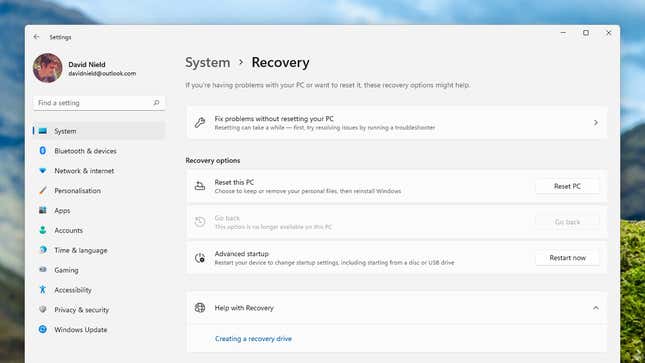
Fortunately, this is much simpler than it used to be, as the choice is now immediately accessible in Windows’ main Settings pane: Select System and Recovery to access the relevant screen.
Depending on the status of your PC, you may wish to first try the Fix problems without restarting your PC: You can use troubleshooting wizards to troubleshoot issues with your internet connection, audio playback, Windows Update, and associated hardware devices.
These troubleshooters may be sufficient to get your computer functioning properly again without the need for a full reset.

If you’ve concluded that a full reset is necessary, go to the Recovery panel and choose Reset PC.
You then have two options: Keep my files (which wipes applications and resets Windows system settings) or Remove everything. (which erases all files, applications and settings, and returns your PC to its original state).
Even if you select Keep my files, we recommend that you have a backup of your files somewhere else in case the reset procedure goes wrong.
We’d also recommend selecting Remove everything to completely reset your PC—but if you don’t want to go through the bother of downloading or copying over all of your stuff again, the alternative option is there. Select Help me pick if you require additional guidance.
To read our blog on “How to modify iPhone’s location sharing settings in 1 minute,” click here