• Activities
    • Health
    • Education
    • Mobile
    • Sports
    • PSL
  • Economy
    • Auto Industry
    • Crypto Currency
    • Economy
    • Smart Devices
  • Tech
    • Startups
    • Social
    • Telecom
    • Technology
  • TechX World
Tuesday, February 3, 2026
TechX Pakistan
GISEC Global
No Result
View All Result
  • Home
  • Health
  • Education
  • Sports
    • Champions Trophy 2025
    • ICC World Cup
    • Asia Cup
    • PSL
    • Point Table
  • Technology
  • Real Estate
    • Property
  • Lawyer
    • Tax Calculator
    • FBR
  • About us
  • Contact
  • Home
  • Health
  • Education
  • Sports
    • Champions Trophy 2025
    • ICC World Cup
    • Asia Cup
    • PSL
    • Point Table
  • Technology
  • Real Estate
    • Property
  • Lawyer
    • Tax Calculator
    • FBR
  • About us
  • Contact
No Result
View All Result
TechX Pakistan
No Result
View All Result
  • Home
  • Health
  • Education
  • Sports
  • Technology
  • Real Estate
  • Lawyer
  • About us
  • Contact
Home How To

How To make ChatGPT a Siri Shortcut on iPhone or iPad

TechX Editor by TechX Editor
April 12, 2023
in How To
Reading Time: 5 mins read
A A
0
how-to-make-chatgpt-a-siri-shortcut-on-iphone-or-ipad

You can always use Safari to access OpenAI’s ChatGPT website whenever you wish. However, creating a Siri shortcut that works with the AI is a more convenient approach.

Instead of attempting to develop your own such shortcut, you can download and install a few bespoke predesigned ones.

Table of Contents

Toggle
    • ChatGPT in Siri Shortcut
    • 1. Obtain API keys
    • 2. Generate a new secret key
      • 1. Obtain the shortcut: Open the SiriGPT shortcut page on your smartphone and tap the Get Shortcut button. Tap the Add Shortcut button on the shortcuts screen. The shortcut is added to the Shortcuts app.
      • 2. Enter the API key
      • 3. Launch SiriGPT
      • 4. Pose a query
  • How to Launch a Shortcut from the Home Screen
    • 2. Pose a query

ChatGPT in Siri Shortcut

I tested three different ChatGPT Siri shortcuts during my testing: SiriGPT, ChatGPT Siri, and Siri Pro. They all worked together to bring the power of ChatGPT to the iPhone and iPad.

After you’ve created the shortcut, you can use it in a variety of ways. You can launch the Shortcuts app and select the shortcut icon.

You can add the shortcut to your Home screen to make it more accessible. You can also enable the shortcut by requesting Siri to do so.

1. Obtain API keys

The first step is to obtain the required API keys from Open AI. A ChatGPT shortcut uses these keys to send queries to the ChatGPT service and receive answers.
Regardless of which ChatGPT shortcut you choose, the process for receiving the keys is the same.

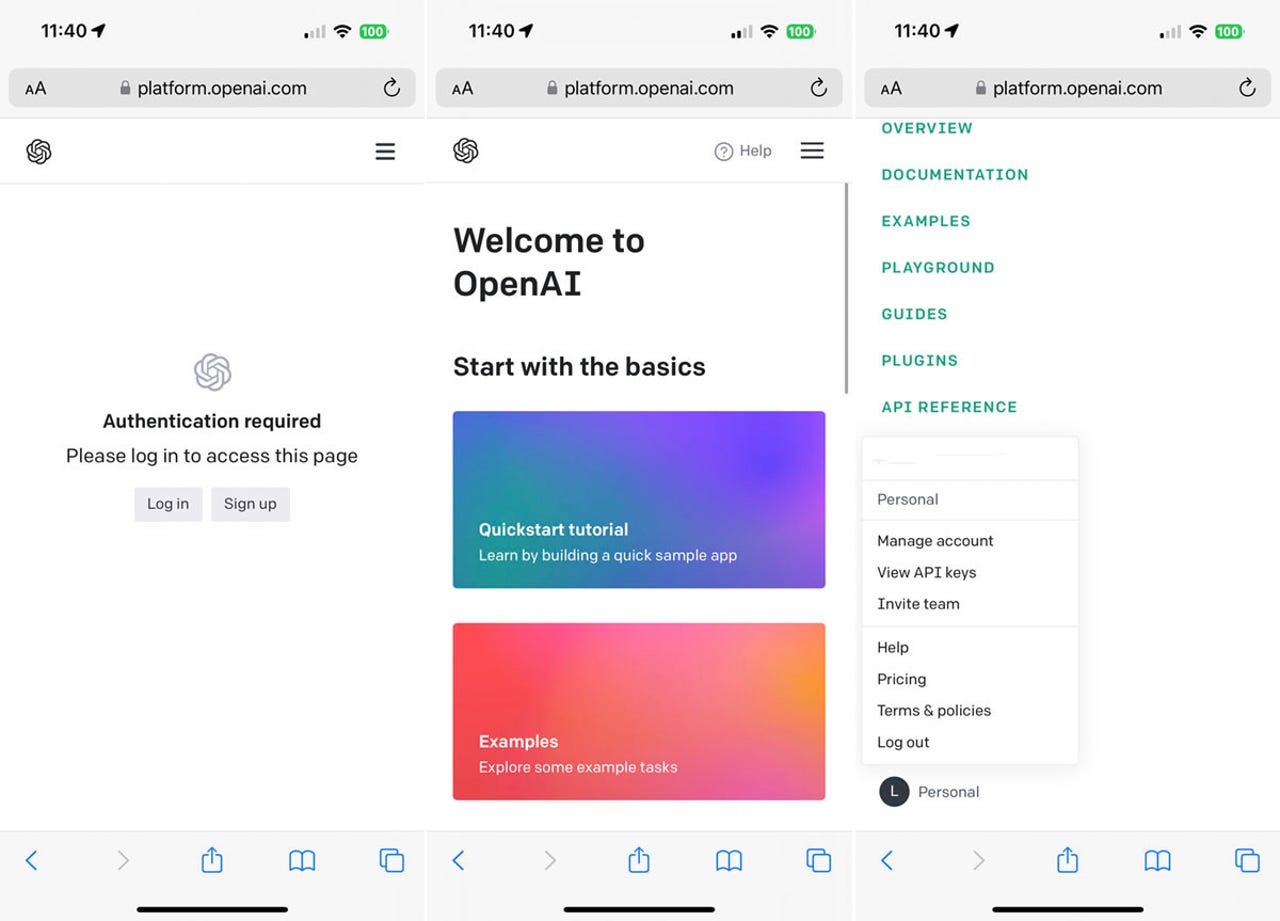
Open Safari on your iPhone or iPad and navigate to the Open AI platform page. If you don’t already have an OpenAI account, click the Sign up option.

Otherwise, click the Log in button and sign in with your account. Tap the three-line hamburger icon in the upper right corner, then scroll to the bottom of the Settings menu and choose your profile. Tap View API keys from the profile menu.
how-to-make-chatgpt-a-siri-shortcut-on-iphone-or-ipad

2. Generate a new secret key

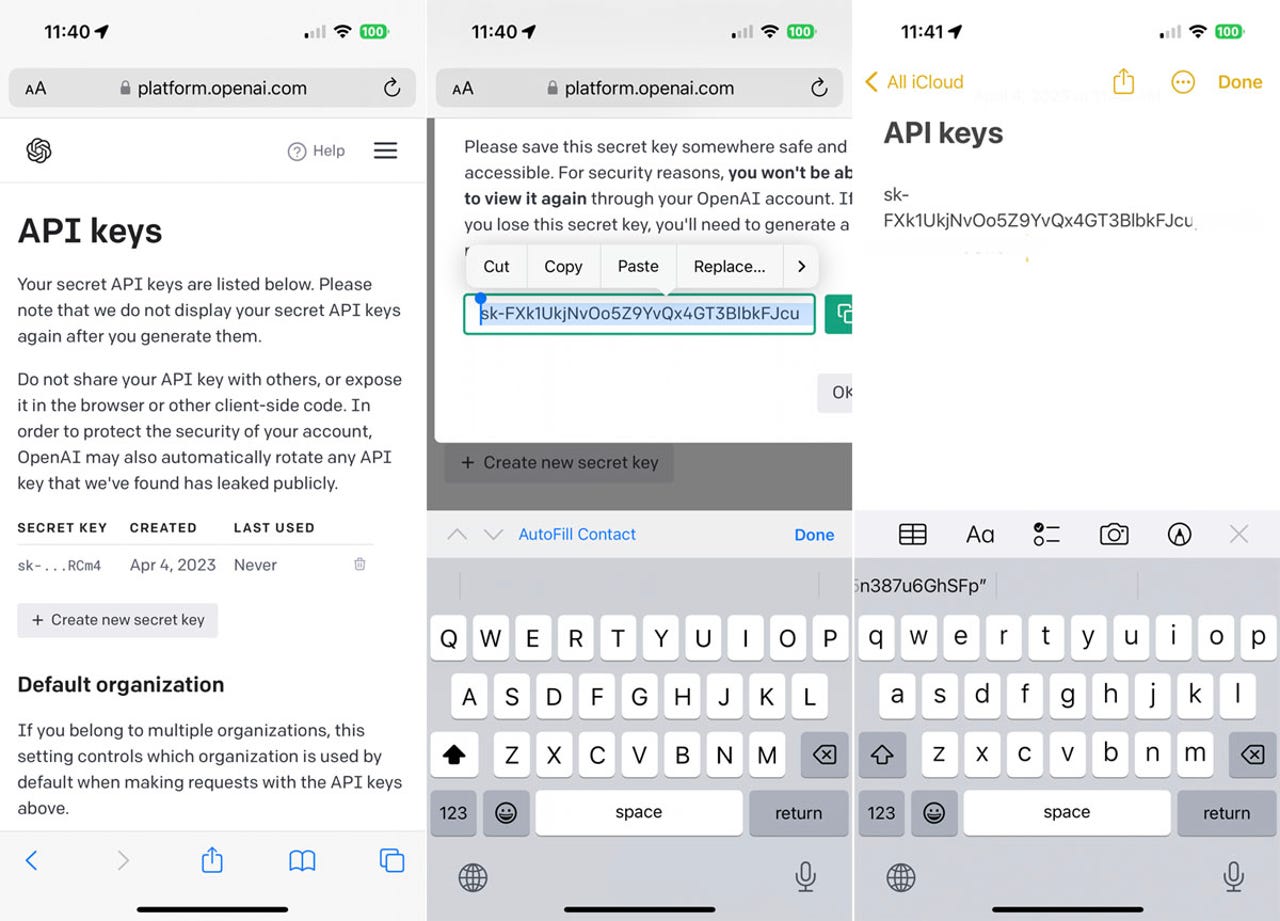
Tap the Create new secret key button on the API keys screen. Tap Copy after selecting the entire string by pressing down on the key.

Open a note and paste the key into it. Return to the Open AI platform page, tap OK, and then tap Create new secret key to generate another key if you intend to attempt more than one ChatGPT shortcut. Rep the copying and pasting.
how-to-make-chatgpt-a-siri-shortcut-on-iphone-or-ipad


How to Make Use of SiriGPT

1. Obtain the shortcut:
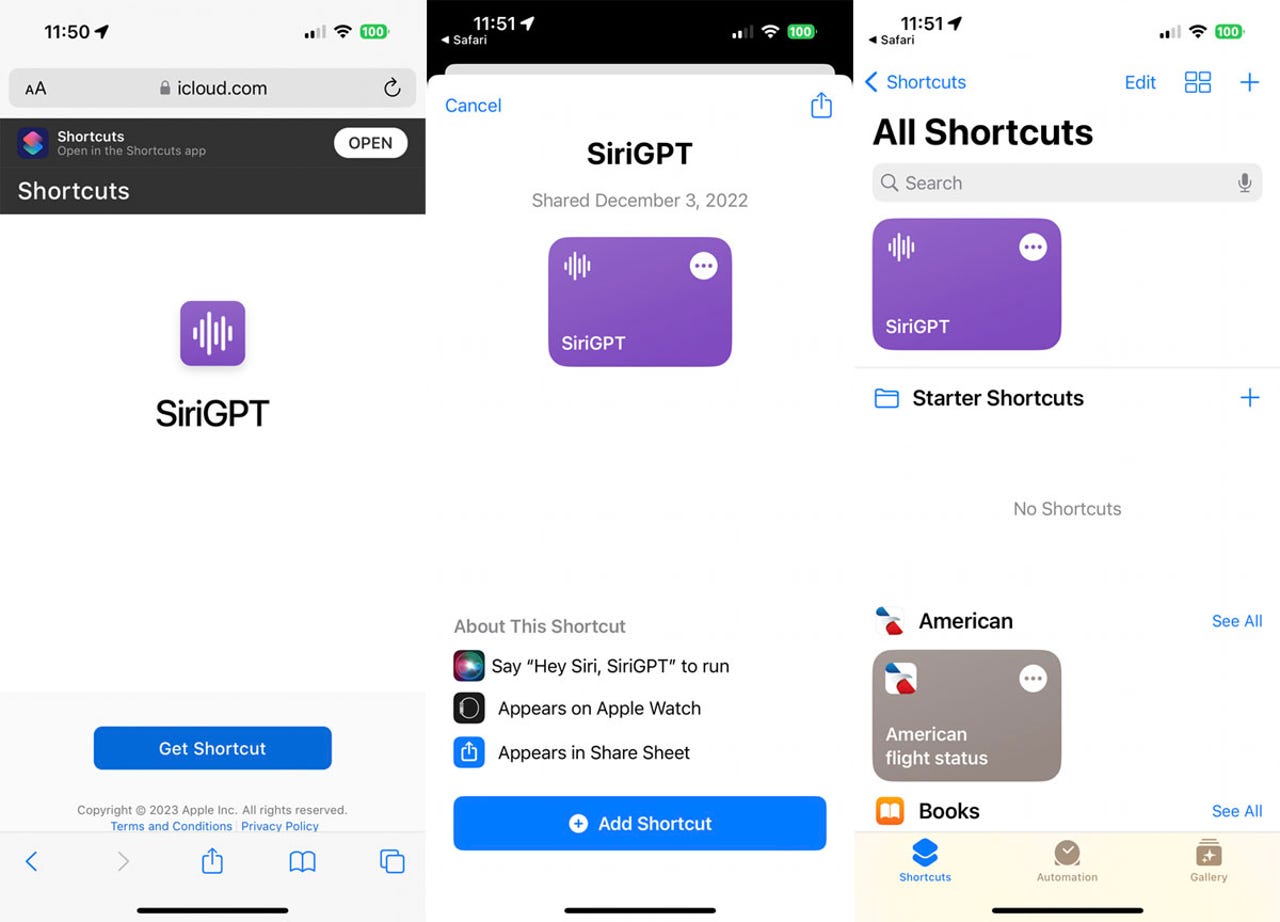
Open the SiriGPT shortcut page on your smartphone and tap the Get Shortcut button. Tap the Add Shortcut button on the shortcuts screen. The shortcut is added to the Shortcuts app.
how-to-make-chatgpt-a-siri-shortcut-on-iphone-or-ipad

2. Enter the API key

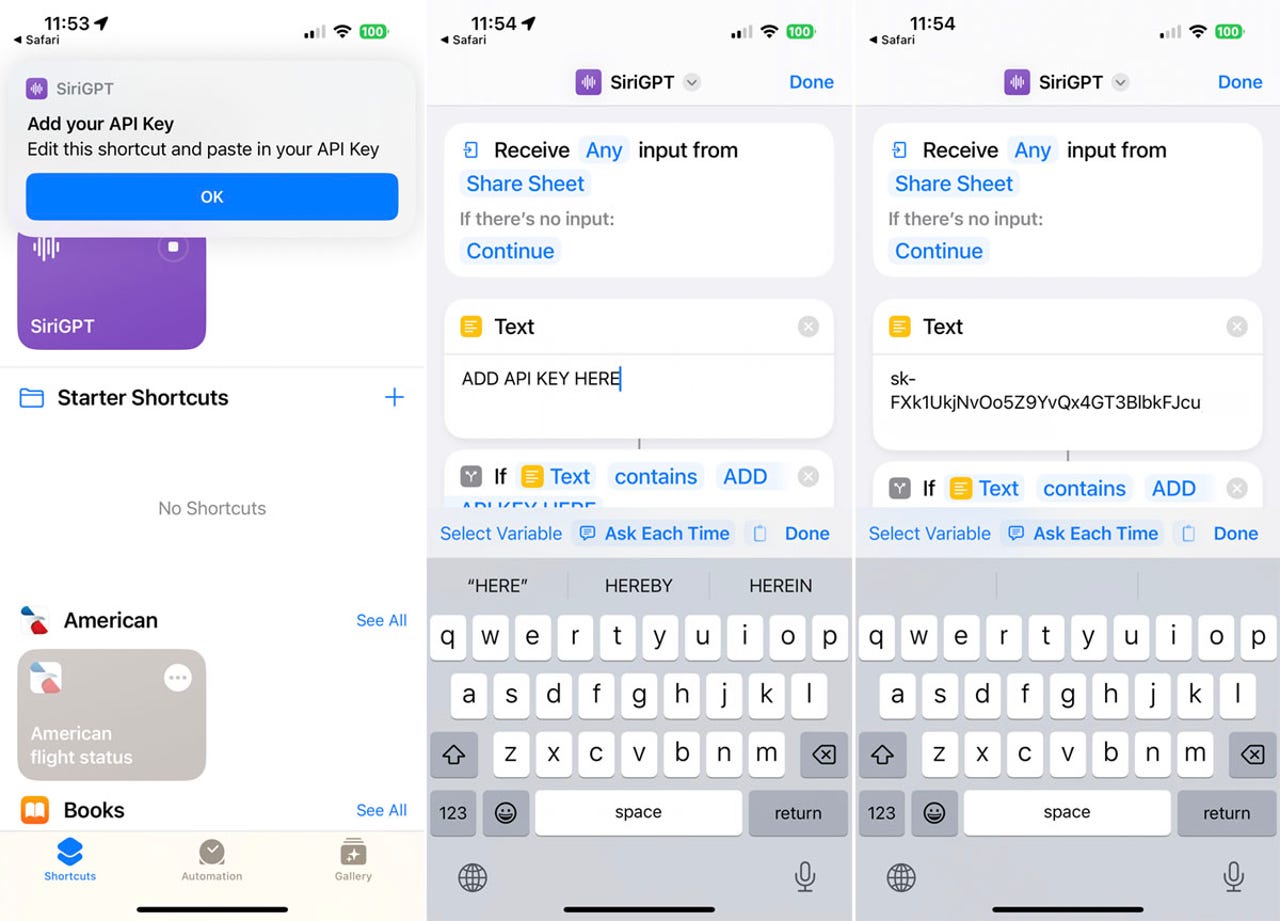
Return to the note where one or more of the API keys were pasted. Choose and copy a single set of keys.

Return to the Shortcuts app and select the SiriGPT shortcut by tapping the three-dot icon. Remove the sentence ADD API KEY HERE from the text field and then paste the API key you just copied. Select Done.
The API key being pasted

3. Launch SiriGPT

To start SiriGPT, tap the shortcut. When you do this for the first time, you will be asked to provide it access to Speech Recognition. Select Allow.
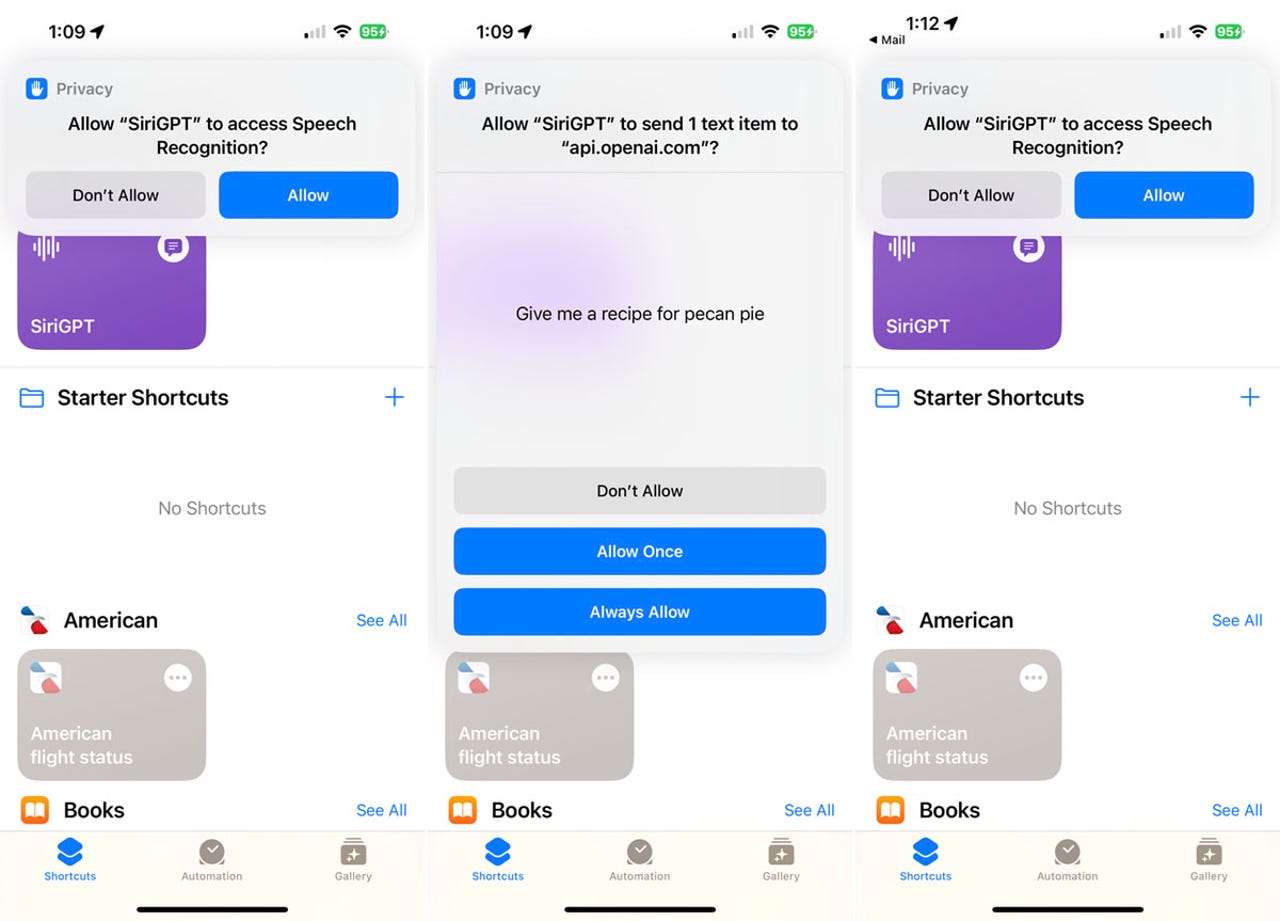
The shortcut being run

4. Pose a query

Your request can be typed or spoken. When prompted to connect to api.openai.com, tap Allow.

The response is then displayed and spoken by SiriGPT. At any time, tap Done. To end the conversation, tap Done. To ask another question, tap Ask Again.

How to Launch a Shortcut from the Home Screen

Instead of launching a shortcut via the Shortcuts app, you can do it from the Home screen.

1. Include on the home screen

To do so, tap the symbol for one of the ChatGPT shortcuts and click Share. Tap the Add to Home Screen option from the Share menu. Tap Add after previewing the shortcut’s name and icon.

how-to-make-chatgpt-a-siri-shortcut-on-iphone-or-ipad

2. Pose a query

To receive a response, tap the icon on the Home screen and then voice or type your request.

To read our blog on “Alibaba, a Chinese tech firm, to release ChatGPT competitor,” click here

Tags: siri appsiri chatsiri downloadsiri onlinesiri voicetalk to siri
Share54Tweet34Share10Send
TechX Editor

TechX Editor

Hi! I'm the Editor at TechX Pakistan, where I specialize in managing and enhancing the SEO for our website. My role involves optimizing content to ensure maximum visibility and engagement, analyzing performance metrics to drive traffic, and staying up-to-date with the latest in search engine algorithms. My goal is to ensure that our website not only reaches but also resonates with our target audience, ensuring they find exactly what they need quickly and efficiently.

Related Posts

How to Get an Internship at the National Assembly of Pakistan

by TechX Editor
April 21, 2025
0
How to Apply for National Assembly Internship of Pakistan

The National Assembly of Pakistan has announced its Parliamentary Internship Program – Summer Batch 2025, offering a six-week hands-on experience for students and...

Read moreDetails

How to Check Ufone Remaining MBs in 2025

by TechX Editor
April 5, 2025
0
How to Check Ufone Remaining MBs in 2025

In 2025, staying connected is essential, and monitoring your data balance ensures uninterrupted internet access. Ufone offers multiple ways to...

Read moreDetails

Follow Us

Promoted

techx

TechX Pakistan Strengthens Digital Presence as Official Media Partner of ITCN Asia 2026

by TechX Content Specialist
January 17, 2026
0

TechX Pakistan proudly serves as the Official Digital Media Partner of ITCN Asia, Pakistan’s largest and Asia’s leading technology exhibition...

TechX Pakistan Digital Media Partner at Global CISO Summit 2026

TechX Pakistan Joins Global CISO Summit 2026 as Digital Media Partner

by TechX Editor
January 10, 2026
0

TechX Pakistan is honored to be announced as the Digital Media Partner for the Global CISO Summit 2026 – Pakistan...

Global CISO Summit 2026

Global CISO Summit & Future Leaders Awards 2026- Pakistan Edition

by TechX Editor
January 5, 2026
0

One of the most anticipated cybersecurity and technology gatherings of the year, the Global CISO Summit 2026 – Pakistan Edition...

Global CISO Summit 2026

Global CISO Summit 2026 at ITCN Asia

by TechX Editor
January 2, 2026
0

The Global CISO Summit and Future Leaders Awards 2026 will be a flagship event of the 27th ITCN Asia. Hosted...

Recent News

Snapchat Blocks 415,000 Accounts in Australia as Teens Face Social Media Ban

Snapchat Blocks 415,000 Accounts in Australia as Teens Face Social Media Ban

February 2, 2026
Saudi Arabia Arrests Thousands for Law Violations

Saudi Arabia Arrests Thousands for Law Violations

February 2, 2026
SME

ABHI Microfinance Bank DigiKhata partner to unlock financing for SMEs

February 2, 2026
kashmir

Federal Government Declares February 5 Public Holiday for Kashmir Solidarity Day

February 2, 2026
Gold and Silver

Significant Decrease in Gold and Silver Prices in Pakistan

February 2, 2026
Islamabad lawyers

Health Cards Announced for Islamabad Lawyers and Their Families

February 2, 2026
Currently Playing

TechX Pakistan at GITEX Dubai 2024 | Innovation, AI & Global Tech Highlights

TechX Pakistan at GITEX Dubai 2024 | Innovation, AI & Global Tech Highlights

00:02:06

TechX Pakistan at LEAP 2025 | Saudi Arabia’s Mega Tech Conference Uncovered

00:03:37

Pakistan – The Mineral Marvel | Pakistan Pavilion at Future Minerals Forum 2025

00:03:09

TechX Pakistan at ITCN Asia Karachi 2024 | Innovation, Startups & Future Tech Highlights

00:02:22

TechX Pakistan at ITCN Asia Lahore 2024 | Official Media Partner Coverage

00:03:41

TechX x Doogee | GITEX 2024 Collaboration Featuring Iranian TikTok Star

00:01:09

Highlights from the World CIO 200 Summit - Pakistan Edition 2024 | TechX Pakistan

00:01:42

Leap 2024 | The most attended tech event in Saudi Arabia | covered by TechX Pakistan

00:03:46

Gitex Dubai 2023 Sneak Peeks by TechX Pakistan

00:01:47

Gitex Africa 2023: TechX Pakistan Honored To Cover The Event. @GITEXAFRICA

00:01:50

LEAP 2023, a Global Technology Event at Riyadh covered by TechX Pakistan

00:02:40

GITEX GLOBAL 2022 Presence of Pakistan, Connexion Lounge sponsored by @MinistryofITTelecomPakistan

00:01:40

ITCN Asia 2022 | 21st International IT and Telecom Show | Curtains Opened | TechX Pakistan

00:05:28

London Tech Week 2022 Highlights | #Pakistan #Software

00:02:58

#Zindigi Future Fest 2022 Curtains Opened | Day 01 Glimpses | Tour | TechX Pakistan

00:03:13

Wait is Over, ITCN Asia Pakistan Tech Fest 2022 is live now!

00:01:44

CXO Meetup Dubai by Tech Destination Pakistan - P@SHA x PSEX x MoITT

00:02:41

Workshop on IT Investment Opportunities by Tech Destination Pakistan

00:00:56

Pakistan Pavilion at GITEX Dubai 2021

00:01:39

#GITEX 2021 Curtains Opened | Day 01 Glimpses | 5G | Technology | Tour | TechX Pakistan

00:01:33

GITEX Technology Week 2020 by TechX Pakistan - Official Media Partner

00:01:27

Newsletter Subscription

Get daily/weekly tech updates, exclusive insights, and breaking news delivered directly to your inbox.

Loading

Since 2019, TechX Pakistan has been revolutionizing local tech and social blogging. We bring the latest news, interviews, and events on global and local advancements.

Join us in exploring IT startups, business insights, and social media trends. Celebrate and drive the tech evolution with us!

USEFUL LINKS

Home

About Us

Contact Us

Privacy Policy

Sponsored

Terms and Conditions

Site Map

CATEGORIES

Health

Crypto Currency

Technology

Sports

Finance

Curent Affairs

FOLLOW US

TECH INSIGHTS

Stay informed about the latest advancements in technology. Join our WhatsApp Group to receive curated news, insights, and updates straight to your inbox.

© 2025 TechX.pk - All right reserved 

Welcome Back!

Login to your account below

Forgotten Password?

Retrieve your password

Please enter your username or email address to reset your password.

Log In

Add New Playlist

No Result
View All Result
  • Home
  • Health
  • Education
  • Sports
    • Champions Trophy 2025
    • ICC World Cup
    • Asia Cup
    • PSL
    • Point Table
  • Technology
  • Real Estate
    • Property
  • Lawyer
    • Tax Calculator
    • FBR
  • About us
  • Contact

© 2019 - 2024 TechX Pakistan - All Rights Reserved

Go to mobile version