
Instagram is one of the most content-rich platforms on the internet, home to billions of videos, reels, stories, and photos shared every single day. Yet despite all that richness, Instagram itself offers no native option to save content to your device — a frustrating limitation for creators, marketers, educators, and everyday users alike. That is exactly where SaveFromIns Instagram downloader steps in, delivering a seamless, browser-based solution that puts full control of Instagram content back in your hands.
Whether you want to save a travel reel for offline viewing, archive your own stories before they disappear, or download a product carousel for reference, SaveFromIns handles every use case with speed and simplicity. There is nothing to install, no account required, and no complicated process to learn — just paste, click, and download.
Everything You Need to Download from Instagram, in One Place
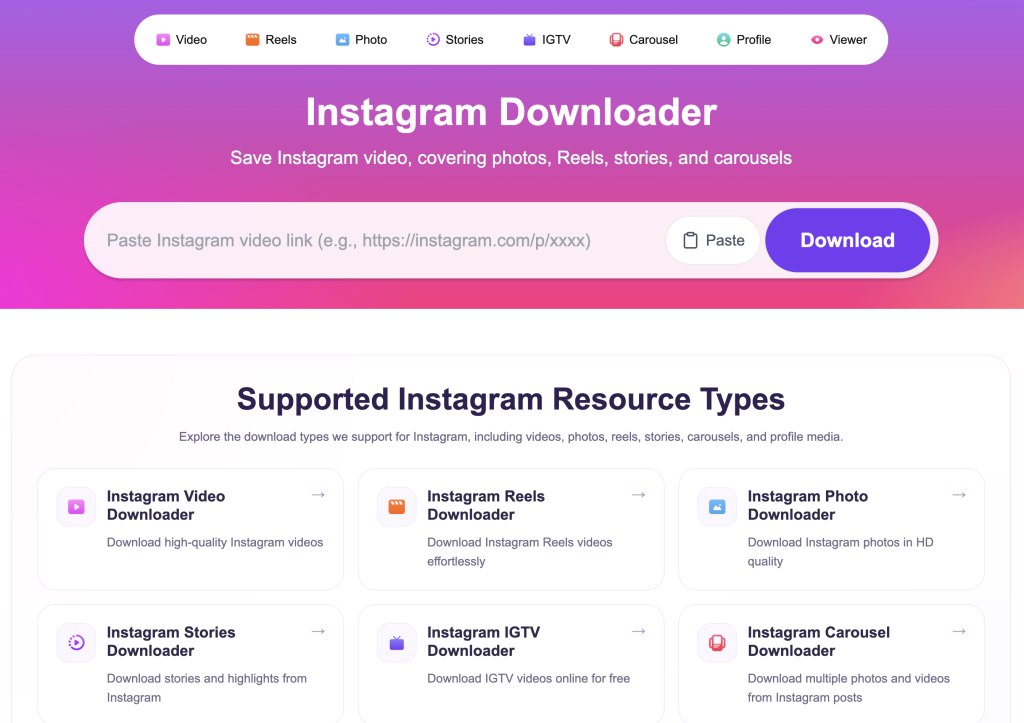
Most Instagram download tools support only one or two content types, forcing you to juggle multiple services depending on what you need. SaveFromIns eliminates that friction entirely by supporting the full range of Instagram resource types under a single, unified platform. From standard feed videos and high-resolution photos to reels, stories, carousels, and even profile media, every major content format is covered.
This comprehensive support means you never have to leave the platform or switch tools mid-workflow. Whether you are a social media manager pulling reference content, a content creator archiving your own posts, or simply someone who wants to keep a memorable clip, SaveFromIns is built to handle it all without compromise.
How SaveFromIns Works: Simple by Design
The entire process has been engineered to be as frictionless as possible. Start by opening the Instagram post, reel, story, or profile you want to save — then copy its URL directly from your browser or the Instagram app. Next, head over to the SaveFromIns website, paste that link into the input field, and hit the download button. Within moments, the tool fetches the media and presents it ready for saving to your device.
For video content specifically, you can perform an instagram video download via link in just a few seconds, with no sign-in wall, no email verification, and no hidden steps slowing you down. The interface is clean and distraction-free, so you can move quickly whether you are downloading one file or working through a batch of content.
Supported Content Types: A Full Breakdown
Videos — Standard Instagram video posts are fully supported, and downloads are delivered at the best available quality. Whether the video is a few seconds long or several minutes, the process is identical and just as fast.
Reels — Instagram Reels have become one of the platform’s most popular formats, and SaveFromIns supports them natively. Save any public reel in moments, complete with audio, for offline viewing or personal archiving.
Stories — Stories disappear after 24 hours, which makes timely saving essential. SaveFromIns allows you to capture story content before it vanishes, giving you a permanent record of moments that were designed to be temporary.
Photos — High-resolution Instagram photos can be downloaded directly, preserving the original image quality that makes them worth saving in the first place.
Carousels — Multi-image and multi-video carousel posts are fully supported, so you can save every slide in a post without having to screenshot each one individually.
Profile Media — SaveFromIns also supports downloading profile-level media, making it easy to archive a creator’s content or save your own uploads as a backup.
Who Benefits Most from SaveFromIns?
Content creators and influencers will find immediate value in the ability to archive their own posts, reels, and stories — particularly stories, which disappear automatically and are otherwise difficult to recover. Having offline backups of your own published content is smart practice for anyone building a brand on Instagram.
Marketing professionals and social media strategists can use SaveFromIns to collect competitor content for research, save inspiration for creative briefs, or download client-approved assets for repurposing across channels. Educators and journalists, meanwhile, may need to save video or image content for reporting, documentation, or educational use cases where reliable access to media is critical. In every scenario, the tool’s breadth of supported formats means there is rarely a situation where it falls short.
What Sets SaveFromIns Apart from the Competition
The Instagram downloader space is crowded, but most tools come with significant trade-offs — limited format support, intrusive ads, mandatory account creation, or unreliable performance. SaveFromIns is purpose-built to avoid all of those pitfalls. The platform is entirely browser-based, meaning it works equally well on desktop, tablet, and mobile without requiring any app installation.
The tool’s multi-format support is a genuine differentiator. Rather than specializing in just videos or just photos, SaveFromIns covers the entire Instagram content ecosystem, making it the only tool most users will ever need. Paired with its fast processing and clean user experience, it stands as a genuinely practical solution rather than a novelty.
Start Saving Instagram Content Today
Instagram content moves fast, and the ability to save what matters — before it disappears or becomes inaccessible — is more valuable than ever. SaveFromIns offers a reliable, versatile, and user-friendly way to do exactly that, supporting every major content format the platform has to offer.
If you have been looking for a smarter, simpler way to download Instagram media, the answer is already available. Visit SaveFromIns, paste your first link, and experience the difference a well-built tool makes.