

Elon Musk’s X, once known as Twitter, has been a simmering cauldron of unusual advertising decisions, constant upheavals, and strange testosterone overflows in recent months.
Twitter & its peaceful waters
Twitter has never been known for its peaceful waters. Before Musk, Twitter was the most dependable double-edged blade in the social media industry.
One minute you’re retweeting a funny meme account and having a good time talking about your latest TV binge, and the next you’re getting buried by a harassment campaign or having your day destroyed by a thread that makes you want to throw your laptop out the window.
-
save your tweets
It is suggested that you archive your tweets before deciding how to delete your Twitter history.
To begin, you can just keep the folder in case you ever want to casually scroll back to that three-month period when you first signed up for Twitter and all you could think to tweet.
But the major reason you should archive your tweets is that if you have more than 3,200 tweets, you won’t be able to delete them until you archive them.
Individuals can only remove individual posts, and if you use a third-party software, Twitter will only allow it to erase the last 3,200 tweets.
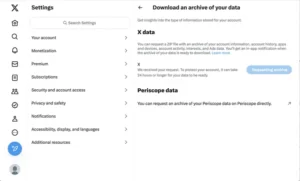
To gain access to your archive, follow these steps:
- Go to your Twitter account and choose More > Settings and Support > Settings and Privacy in the left-hand column.
- Click Download an archive of your data under the Your Account column. It may take a day or more to receive your data, so if you are in a rush to remove your Twitter data, plan beforehand.

2) Delete individual tweets
If you merely want to delete a few older tweets because they are embarrassing, you have changed your opinion, or you don’t want your new employer tripping over them, you can do it one at a time.
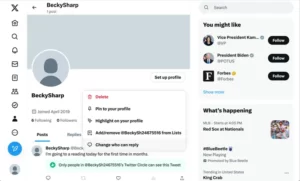
- Navigate to your Profile page.
- Locate the tweet you wish to remove and click the three dots to the right of it.
- Select Delete.
- A confirmation prompt will appear. If you are, select Delete.
3) Select a Service
There are numerous services available to help you manage and delete your Twitter history. Some are free, while others require a subscription fee. None of them can erase more than your last 3,200 tweets.
Among the most recent apps are:
Even if you’ve used one of these to erase all of your previous tweets, it’s a good idea to double-check.
To read our blog on “Twitter to send Blue Tick users data to Israel to verify,” click here