
You may have sent sensitive information in an innocent email, only to discover that some bad actor intercepted the message and was able to easily read the content and extract the information.
Data privacy has become critical for businesses. Furthermore, some businesses go to great lengths to safeguard their data, files, and communications. However, consumers and small businesses appear to believe that adding extra security isn’t worth the extra work.
The problem with this approach is that anyone who refuses to go the extra mile may find themselves on the receiving end of a data breach.

That is not what you want. Even if it means putting in a little extra effort, being safe is preferable to being sorry. So, what are you going to do? You encrypt your email (or an email that contains sensitive information).
What exactly is email encryption?
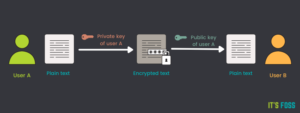
Email encryption is a method of limiting an email so that only the recipient can read it. This is accomplished through the use of encryption key pairs, as follows:
- The recipient generates a GPG key pair (a public and a private key) and sends you the public key.
- You add the public key to your keychain.
- You then send an email to the recipient’s email address (which is linked to the newly imported key).
- The email is received and read by the recipient.
Yes, encrypting your email adds extra steps to your process, but when dealing with sensitive information, those extra steps are well worth the effort.
Because each email client handles this differently, I’ll demonstrate using the free and open-source Thunderbird application.

I’ll also show you how to generate your GPG key (using GnuPG) so you can assist your recipients in generating the necessary key pairs so they can send you their private keys.
To read our blog on “How to make use of Cred Peer-to-Peer UPI in 4 easy steps,” click here