

The YouTube Partner Program (YPP) is the most popular way to monetize videos. Obtaining partner status is an advancement for your channel because it allows you to place advertisements on your videos and potentially earn money every time you upload content.
YouTube pays creators via the Google AdSense program, but it takes some time to figure out how everything works. For now, just know that revenue is generated when a viewer watches/clicks an ad within your video.
That revenue is then divided between you and YouTube, with you receiving 55% and YouTube receiving the remaining 45%.
Requirements for YouTube Monetization
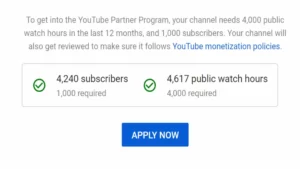
YouTube is very picky about who it allows into its monetization program. Before applying to the YPP, you must have:
- 1,000 subscribers.
- 4,000 watch hours on your channel (within 12 months).
- A willingness to abide by YouTube’s rules, including the community guidelines, advertiser-friendly content guidelines, and terms of service.
How to Participate in the YouTuber Partner Program
You’re ready to apply to the YPP once you’ve met all of YouTube’s requirements. The steps are as follows:
- Navigate to the YouTube Studio.
- In the left navigation bar, select Monetization.
- If you are eligible, you will see a blue button encouraging you to apply. Click here!
- Examine the YPP terms.
- Create a Google AdSense account and link it to your channel.
- Wait with patience. YouTube will review your channel and notify you via email of their decision.

If YouTube rejects your application, you have 30 days to reapply. This allows you to address any issues with your channel, such as multiple copyright claims or videos that violate YouTube’s community guidelines.
How to Enable Monetization
Turn on monetization for as many videos as possible once you’ve entered the YPP. This can be done while uploading new content, but it’s safer to wait until after you’ve uploaded videos (a few hours).
YouTube will have processed your content by then. If the system discovered anything that could demonetize the video, such as extreme profanity, adult themes, copyright claims, and so on, you’ll be notified.
Here’s how to make money by enabling ads on YouTube videos:
- Navigate to the YouTube Studio.
- In the left navigation bar, select Content.
- Choose the video that you want to monetize.
- In the left menu, select Monetization.
- Select which advertisements you want to appear in the video.
- Save the file.


To read our blog on “YouTube Partner Program paves new methods for content creators to earn revenue on the platform,” click here