
When Kelli Worst was assaulted by a man who requested her to help him find his phone at 2:00 a.m. on the beach, the iPhone SOS feature saved her life.
The man threw her to the ground, covering her mouth and nose with his hands and pinning her face in the sand. Worst had gone for her iPhone and pressed and held the side and volume buttons while swiping across to use the SOS option.
The phone made an automatic call to 911. The emergency services were able to hear all that was going on and dispatch assistance as soon as possible. When officers arrived on the scene, the man attempted to flee.
“My phone in my hand and knowing how to activate the SOS feature is what saved my life,” Worst told Wavy.
How do you activate the iPhone SOS function?
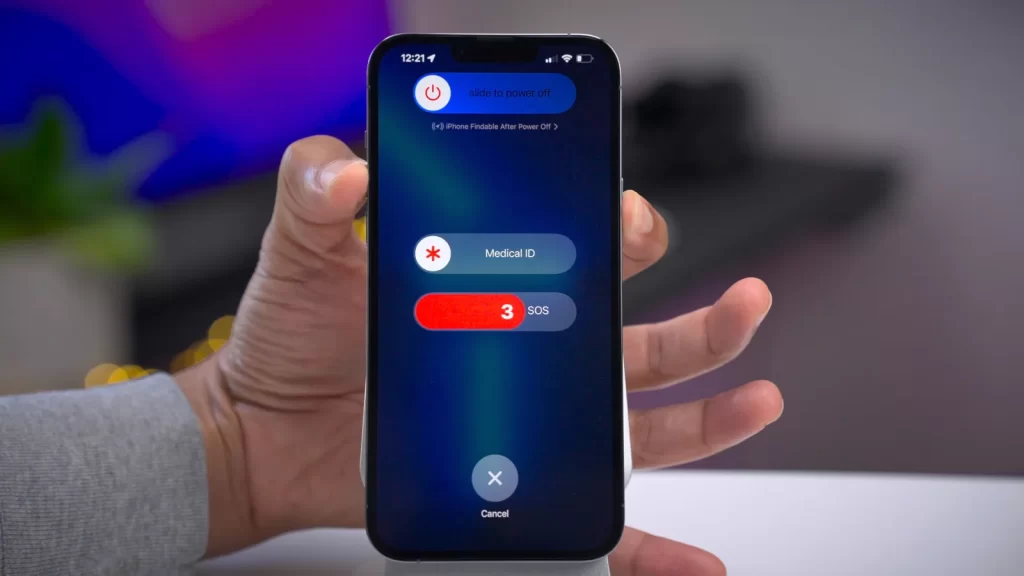
Holding the side button and the volume key together displays the “Emergency SOS” option on the screen, which is the most usual way to activate this feature. To contact emergency services, you’ll need to swipe the selection.
You may set up Auto Call, Emergency SOS, and then SOS settings in Settings.
The device will make an automatic call when the countdown is finished. In Settings, you may even alter the activation feature to “Call with 5 Presses.”
To read our blog on “Older iPhones will no longer be supported by WhatsApp,” click here.